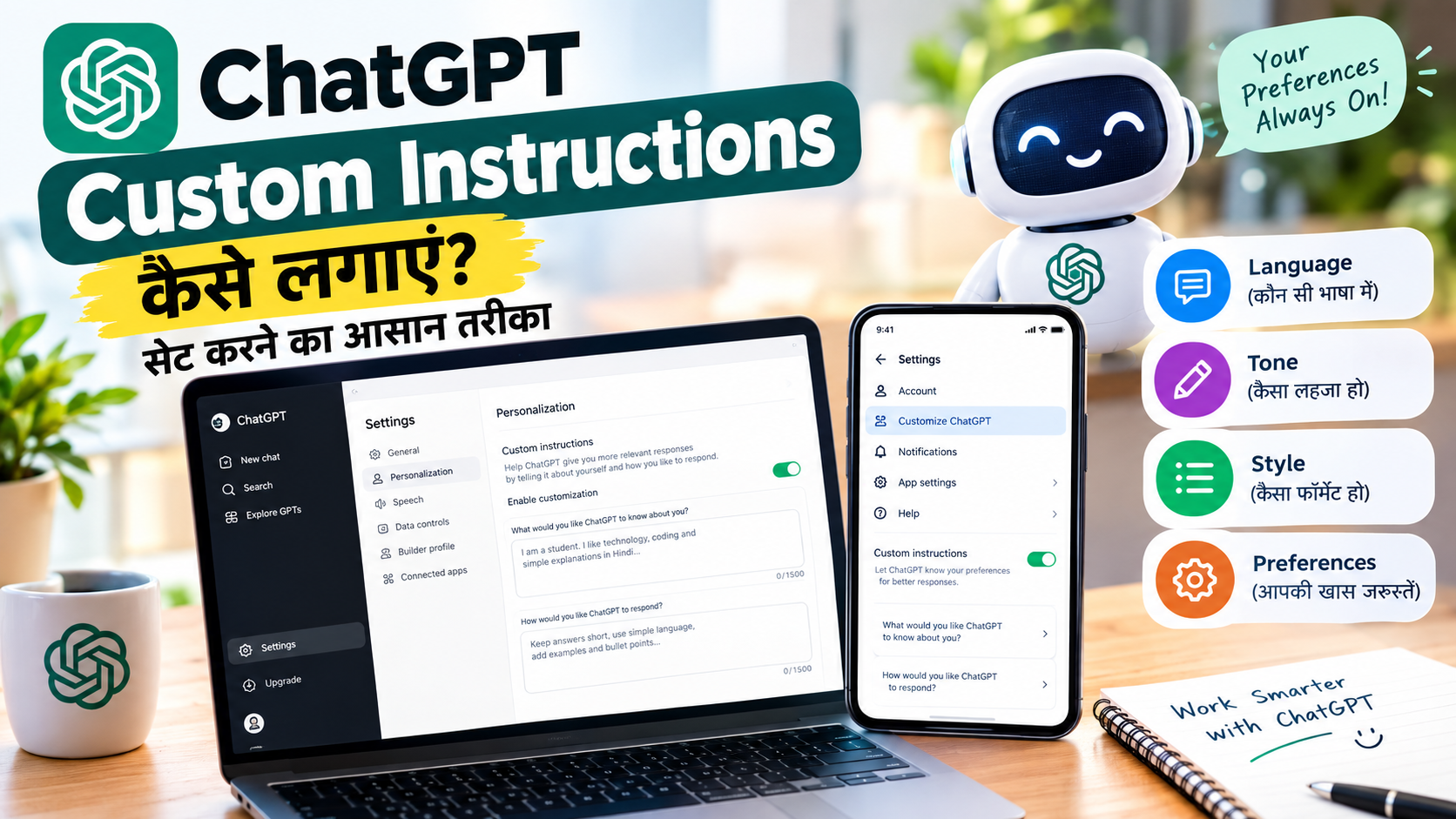
क्या आपको ChatGPT से हर बार एक ही तरह की बातें दोहरानी पड़ती हैं? जैसे—“मुझे जवाब सरल हिंदी में दो”, “जवाब छोटा रखो”, “कोड Python में लिखो” या “जवाब को bullet points में समझाओ।”
अगर हाँ, तो ChatGPT Custom Instructions आपके लिए काफी उपयोगी फीचर हो सकता है। इसमें आप ChatGPT को अपनी पसंद, जरूरत और जवाब देने के तरीके के बारे में पहले से बता सकते हैं।
इससे हर नई बातचीत में अपनी सामान्य preferences बार-बार लिखने की जरूरत कम हो सकती है।
इस लेख में जानेंगे कि ChatGPT Custom Instructions क्या है, इसे PC और मोबाइल में कैसे सेट करें, इसमें क्या लिखना चाहिए और Custom Instructions और Memory में क्या अंतर है।
ChatGPT Custom Instructions क्या है?
Custom Instructions ChatGPT का एक personalization feature है। इसकी मदद से आप ChatGPT को बता सकते हैं कि वह आपके बारे में किन बातों को ध्यान में रखे और आपको किस तरह के जवाब पसंद हैं।
उदाहरण के लिए आप लिख सकते हैं:
- मुझे सरल हिंदी में जवाब दें।
- जवाब को छोटे paragraphs में रखें।
- जरूरत पड़ने पर bullet points का इस्तेमाल करें।
- Technical terms का आसान अर्थ भी बताएं।
- Coding questions में Python को प्राथमिकता दें।
- पहले सीधा जवाब दें और फिर जरूरत के अनुसार विस्तार करें।
इस तरह की सामान्य preferences को पहले से सेट करने पर ChatGPT responses को आपकी पसंद के अनुसार customize करने की कोशिश कर सकता है।
ChatGPT Custom Instructions कैसे काम करता है?
इसे आप ChatGPT के लिए एक personal preference guide की तरह समझ सकते हैं।
मान लीजिए आप चाहते हैं कि ChatGPT हमेशा सरल भाषा में जवाब दे। इसके लिए आप Custom Instructions में लिख सकते हैं:
“मुझे आसान और स्पष्ट हिंदी में जवाब दें। जहां जरूरी हो, उदाहरण देकर समझाएं।”
इसके बाद ChatGPT आपकी responses को तैयार करते समय इस preference को ध्यान में रख सकता है।
हालांकि, Custom Instructions को ऐसी guarantee नहीं समझना चाहिए कि हर परिस्थिति में ChatGPT केवल इन्हीं instructions के अनुसार जवाब देगा। Current prompt और बातचीत का context भी response को प्रभावित कर सकते हैं।
ChatGPT Custom Instructions कैसे सेट करें?
अब जानते हैं ChatGPT Custom Instructions Kaise Use Kare और इसे PC तथा मोबाइल में कैसे सेट किया जाता है।
PC या Laptop में Custom Instructions कैसे सेट करें?
अगर आप ChatGPT को browser या desktop पर इस्तेमाल कर रहे हैं, तो इन steps को follow करें:
Step 1: ChatGPT खोलें और अपने account में login करें।
Step 2: Settings खोलें।
Step 3: Personalization section में जाएं।
Step 4: Enable customization को ON करें।
Step 5: Custom Instructions में अपनी preferences और instructions लिखें।
अब आपकी Custom Instructions settings ChatGPT के responses को personalize करने में मदद करेंगी।
Mobile में ChatGPT Custom Instructions कैसे सेट करें?
Android या iPhone में ChatGPT Custom Instructions कैसे लगाएं, इसके लिए:
Step 1: अपने फोन में ChatGPT ऐप खोलें।
Step 2: Settings में जाएं।
Step 3: Customize ChatGPT विकल्प खोलें।
Step 4: Enable customization को ON करें।
Step 5: Custom Instructions में अपनी पसंद और जरूरी instructions लिखें।
इसके बाद ChatGPT आपकी दी गई preferences को responses को customize करते समय ध्यान में रख सकता है।
Custom Instructions में क्या लिखें?
अगर आपको समझ नहीं आ रहा कि ChatGPT Custom Instructions में क्या लिखना चाहिए, तो अपनी जरूरत के अनुसार सामान्य instructions लिख सकते हैं।
भाषा के लिए
मुझे सरल हिंदी में जवाब दें। जरूरी technical terms English में लिख सकते हैं, लेकिन उनका आसान अर्थ भी बताएं।
जवाब की लंबाई के लिए
सामान्य सवालों के जवाब concise रखें। जब किसी विषय को विस्तार से समझाना जरूरी हो, तब पर्याप्त जानकारी दें।
Formatting के लिए
जहां उपयोगी हो, headings, bullet points और numbered steps का इस्तेमाल करें।
Coding के लिए
Coding questions को पहले आसान भाषा में समझाएं। इसके बाद code दें। जब तक मैं दूसरी programming language न बताऊं, Python को प्राथमिकता दें।
इस तरह की instructions आपके रोजाना के काम के अनुसार Custom Instructions को ज्यादा उपयोगी बना सकती हैं।
ChatGPT Custom Instructions और Memory में क्या अंतर है?
बहुत से users Custom Instructions और Memory को एक ही चीज समझते हैं, लेकिन दोनों अलग features हैं।
Custom Instructions
इसमें आप खुद ChatGPT को direct guidance देते हैं कि उसे आपके बारे में क्या जानना चाहिए और responses किस तरह देने चाहिए।
Memory
Memory एक अलग personalization feature है। उपलब्ध होने पर ChatGPT relevant information को future conversations को personalize करने के लिए याद रख सकता है।
इसलिए Custom Instructions को “Permanent Memory” कहना technically सही नहीं है।
दोनों का उद्देश्य personalization से जुड़ा है, लेकिन उनका काम और तरीका अलग है।
क्या Custom Instructions को बाद में बदल सकते हैं?
हाँ। अगर आपकी preferences बदल जाती हैं, तो आप Settings में जाकर Custom Instructions को edit कर सकते हैं।
आप चाहें तो अपनी instructions को बदल सकते हैं या customization को disable कर सकते हैं।
इसका मतलब है कि अगर पहले आपने लिखा था:
“मुझे हमेशा बहुत छोटे जवाब दें।”
और बाद में आपको detailed answers पसंद आने लगें, तो आप अपनी Custom Instructions को update कर सकते हैं।
ChatGPT Custom Instructions की Character Limit कितनी है?
Character limit आपके ChatGPT plan पर निर्भर करती है।
वर्तमान OpenAI documentation के अनुसार:
- Free और Go: 1,500 characters
- Plus, Pro, Enterprise, Business और Education: 5,000 characters
इसलिए सभी users के लिए केवल 1,500 characters की limit बताना सही नहीं है।
क्या ChatGPT Custom Instructions Free में काम करता है?
हाँ। Custom Instructions ChatGPT के सभी plans में उपलब्ध है।
हालांकि, अलग-अलग plans में character limit अलग हो सकती है।
इसलिए अगर आप Free ChatGPT इस्तेमाल करते हैं, तब भी आप अपनी सामान्य preferences और response style को Custom Instructions के जरिए सेट कर सकते हैं।
Custom Instructions के क्या फायदे हैं?
ChatGPT Custom Instructions का सबसे बड़ा फायदा यह है कि आपको अपनी सामान्य preferences बार-बार लिखने की जरूरत कम हो जाती है।
इसके कुछ practical फायदे हैं:
1. बार-बार instructions देने की जरूरत कम
अगर आपको हमेशा हिंदी में जवाब चाहिए, तो हर सवाल में “हिंदी में जवाब दो” लिखने की जरूरत कम हो सकती है।
2. Response style तय कर सकते हैं
आप ChatGPT को बता सकते हैं कि आपको short, detailed, formal या आसान भाषा में जवाब पसंद है।
3. Coding में मददगार
Developers और students अपनी programming language, explanation style और code formatting से जुड़ी preferences सेट कर सकते हैं।
4. Learning के लिए उपयोगी
Students ChatGPT को बता सकते हैं कि वह concepts को beginner-friendly language और examples के साथ समझाए।
5. Content creation में मदद
Bloggers और content creators अपनी writing preferences, language और formatting style के बारे में सामान्य instructions दे सकते हैं।
Custom Instructions का आसान उदाहरण
मान लीजिए आप रोजाना ChatGPT से technology से जुड़े सवाल पूछते हैं।
आप Custom Instructions में लिख सकते हैं:
“मैं technology और AI से जुड़े topics सीख रहा हूं। मुझे जवाब सरल हिंदी में दें। जरूरी English technical terms को brackets में explain करें। जवाब को headings और bullet points में रखें। अगर किसी process के steps हों तो उन्हें numbered list में समझाएं।”
अब technology से जुड़े सवाल पूछते समय ChatGPT आपकी इस preference को ध्यान में रख सकता है।
ChatGPT में Characteristics क्या है?
Custom Instructions के अलावा ChatGPT में Characteristics नाम की personalization सुविधा भी है।
Characteristics के जरिए response की कुछ style preferences को adjust किया जा सकता है, जैसे:
- जवाब कितना concise हो
- tone कैसा हो
- formatting कैसी हो
- enthusiasm का level
- emojis का इस्तेमाल कितना हो
इसलिए अगर आपका उद्देश्य केवल response की overall style को adjust करना है, तो Characteristics भी उपयोगी हो सकता है।
Custom Instructions को कैसे बंद करें?
अगर आप Custom Instructions का इस्तेमाल नहीं करना चाहते, तो इसे settings से disable किया जा सकता है।
PC/Desktop पर:
Settings → Personalization → Custom Instructions → Enable customization OFF
Mobile पर:
Settings → Customize ChatGPT → Enable customization OFF
आप अपनी existing instructions को edit या remove भी कर सकते हैं।
FAQs: ChatGPT Custom Instructions से जुड़े सवाल
1. ChatGPT Custom Instructions क्या है?
यह ChatGPT का personalization feature है, जिसमें आप अपनी preferences और response style से जुड़ी instructions दे सकते हैं।
2. ChatGPT Custom Instructions कैसे use करें?
ChatGPT की Settings में जाकर Personalization या Customize ChatGPT section खोलें, customization enable करें और अपनी instructions दर्ज करें।
3. क्या ChatGPT Custom Instructions Free में उपलब्ध है?
हाँ, Custom Instructions सभी ChatGPT plans में उपलब्ध है। Character limit plan के अनुसार अलग हो सकती है।
4. क्या Custom Instructions और Memory एक ही हैं?
नहीं। Custom Instructions user द्वारा दी गई direct guidance है, जबकि Memory एक अलग personalization feature है।
5. क्या Custom Instructions को बाद में बदल सकते हैं?
हाँ। Settings में जाकर इन्हें कभी भी edit, update या disable किया जा सकता है।
6. Custom Instructions में क्या लिखना चाहिए?
आप अपनी preferred language, response length, formatting style, coding preferences और अन्य सामान्य instructions लिख सकते हैं।
7. क्या Custom Instructions हर जवाब को बदल देता है?
यह आपकी preferences को response तैयार करते समय ध्यान में रखने में मदद करता है, लेकिन current question और conversation context भी response को प्रभावित करते हैं।
निष्कर्ष
अगर आप ChatGPT का इस्तेमाल रोजाना करते हैं और हर बार अपनी पसंद की भाषा, formatting या response style बतानी पड़ती है, तो ChatGPT Custom Instructions आपके लिए उपयोगी feature हो सकता है।
आप इसमें यह बता सकते हैं कि ChatGPT को आपके बारे में किन सामान्य बातों को ध्यान में रखना चाहिए और आप किस तरह के जवाब पसंद करते हैं।
सबसे अच्छी बात यह है कि आपको अपनी सामान्य preferences को हर बातचीत में बार-बार लिखने की जरूरत कम हो सकती है।
बस ध्यान रखें कि Custom Instructions और Memory अलग-अलग features हैं और Custom Instructions को “Permanent Memory” कहना सही नहीं है।
अगर आप ChatGPT को अपने काम, पढ़ाई, coding या content creation के लिए नियमित रूप से इस्तेमाल करते हैं, तो अपनी वास्तविक और बार-बार काम आने वाली preferences को Custom Instructions में सेट करना एक उपयोगी तरीका हो सकता है।